How to List Multiple Positions at the Same Company on Your Resume
Stack related roles under one company heading, or list separate entries for unrelated jobs. Copy-paste examples of both formats, plus ATS parsing tips.
Canonical: https://qa.prezumi.com/blog/multiple-positions-same-company-resume
There are two correct ways to list multiple positions at the same company on a resume. Stack the titles under one company heading, each with its own dates, when the roles were related or part of a promotion track. Give each role its own separate entry when they were genuinely different jobs, or when years passed between them. Both formats are standard, and the rest of this article shows exactly what each one looks like and how to pick. This page settles one specific formatting question; for the rest of the document, section by section, see our resume writing guide.
Getting this right matters more than it seems. Recruiters spend roughly seven seconds on a first scan, by the widely cited estimate, and an internal promotion is one of the strongest signals a resume can carry. If your formatting buries it, the one thing your employer already confirmed about you (that you were good enough to promote) never gets read.
The stacked format: one company, roles listed beneath
Stacking means the company name appears once, with the full span of your employment, and each title sits underneath with its own date range. The newest role goes on top. This is the right choice for promotions and for related roles, because someone skimming sees the upward movement immediately.
Here is what it looks like in plain text:
ACME LOGISTICS — Chicago, IL                        Mar 2019 – Present

Senior Operations Manager                           Jun 2022 – Present
• Promoted to lead a 14-person team across two distribution sites
• Cut average dispatch errors by 22% by rebuilding the QA checklist
• Own a $1.8M annual operations budget and quarterly vendor reviews

Operations Coordinator                              Mar 2019 – Jun 2022
• Scheduled 60+ weekly freight runs across the Midwest region
• Built the route-planning spreadsheet tooling the team still uses
• Selected to train new coordinators after the first year
And here is how that promotion renders on a finished resume — two titles at the same company, each with its own dates and its own bullets:
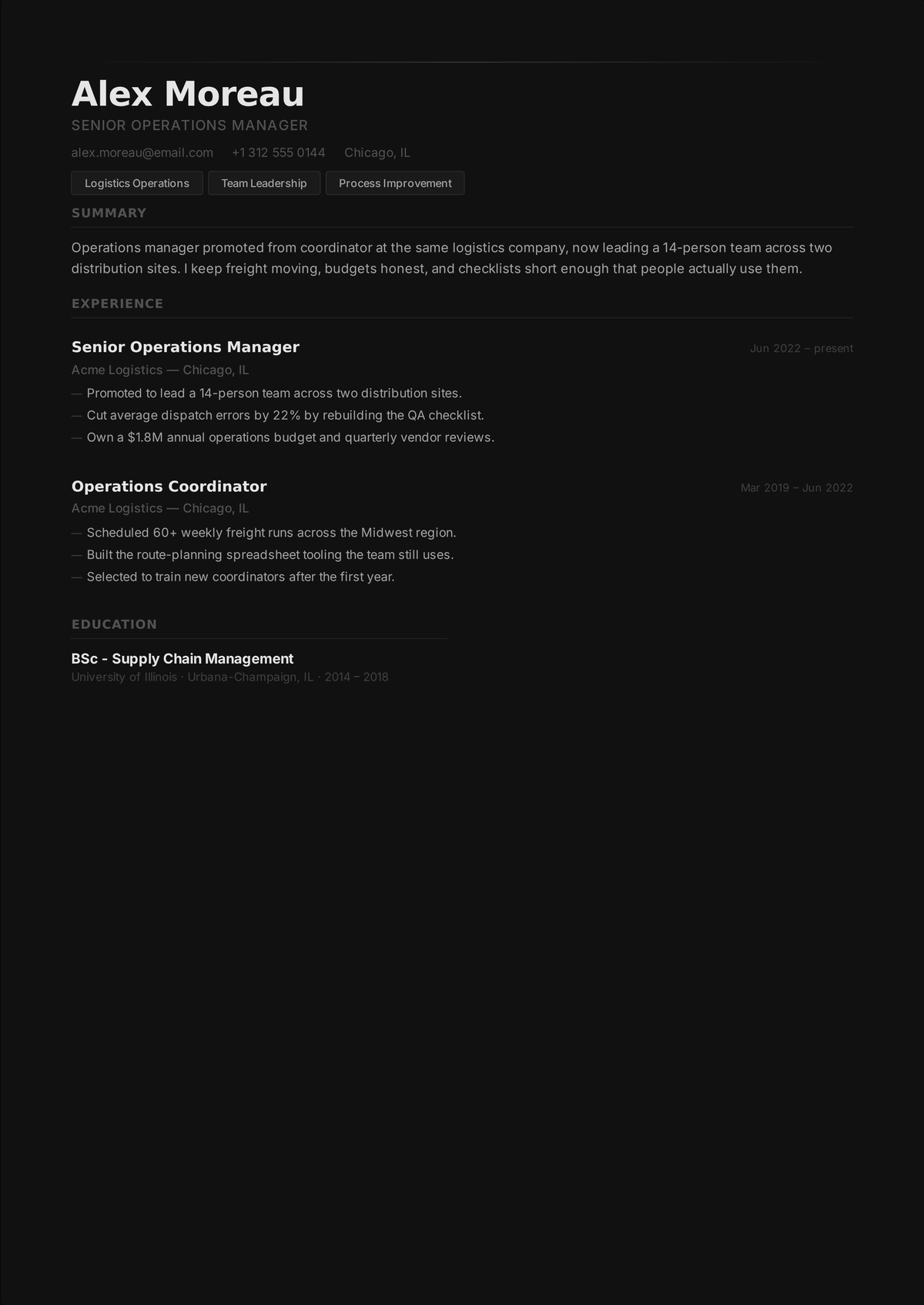
Two dating rules keep this clean. The company line carries your total tenure (first start date to last end date, or "Present"). Each role line carries only the dates you held that specific title. If the company line and the top role line both say "Present", that's fine and expected.
One more rule: each achievement lives under the role where it actually happened. Don't repeat a bullet under both titles, and don't drag your best old accomplishment up into the new role because the new section looks thin. If the senior role is recent and light on results, that's honest, and a single strong bullet beats three recycled ones. A line like "Promoted after leading the 2022 warehouse migration" does double duty: it explains the promotion and credits the work. If you use AI to sharpen these bullets, keep it on a short leash — our guide to ChatGPT resume writing covers how to reword without letting it invent.
The separate-entries format: each role on its own
When the two roles have little to do with each other, stacking them tells a confusing story. If you spent three years as a software developer, left, and came back as a marketing manager, one heading implies a continuity that didn't exist. In that case, list each role as a fully independent entry, with the company name repeated:
NORTHWIND MEDIA — Austin, TX
Marketing Manager                                   Jan 2023 – Present
• Run paid and organic acquisition for a 40k-subscriber product
• Grew newsletter signups 35% in the first year by reworking onboarding

NORTHWIND MEDIA — Austin, TX
Software Developer                                  Jun 2016 – Aug 2019
• Built and maintained the company's CMS used by a 12-person editorial team
• Led the migration from a legacy PHP stack to a modern frontend
Each entry is dated independently, exactly as if they were different employers. If other jobs fall between the two stints, the entries simply sit in their normal reverse-chronological positions. No special treatment needed.
Which format should you choose
Ask one question: would a stranger reading the two titles see a connected story? Coordinator to manager, analyst to senior analyst, engineer to team lead: connected, so stack them. Developer to marketer, or two stints separated by four years elsewhere: not connected, so separate them. The common cases map out like this:
| Situation | Format | Why |
|---|---|---|
| Promotion within one track (coordinator → manager) | Stacked | The upward movement reads at a glance under a single company heading |
| Lateral move within the same function | Stacked | Reads as breadth; separate entries would look like page padding |
| Genuinely different jobs (developer, then marketer) | Separate entries | One heading would imply a continuity that didn't exist |
| Left the company and later returned | Separate entries | Stacking hides the gap and looks like a dating error |
| Three or more roles on one track | Stacked | Keep the trajectory visible and trim the oldest roles to a line or two |
| Title renamed in a reorg, same job | Neither | Use the newest title with the full date range; note the old title if references use it |
Lateral moves are the in-between case. If you moved sideways within the same function (say, from one product team to another with a similar title), stack them; it reads as breadth, and the alternative looks like you're padding the page. If the lateral move crossed into a different function entirely, separate entries usually tell the truth better.
Space is a legitimate tiebreaker too. Stacking saves a full heading's worth of vertical room, which matters on a one-page resume. When the call is genuinely close, stack.
Whichever you pick, keep your LinkedIn profile and cover letter consistent with it. LinkedIn has its own grouping feature for roles at one employer, so use it, and if your cover letter mentions the promotion, use the same titles and dates the resume shows. Recruiters cross-check, and mismatched titles invite questions you don't want to spend interview time on.
How ATS software reads stacked entries
Most employers screen with ATS software — Harvard Business School's Hidden Workers study put it at over 90% of the employers it surveyed — so your formatting has to survive a parser before a human sees it. Start from an ATS-friendly template and run the result through the free ATS resume checker to confirm it parses cleanly. This is where stacked entries get risky. A weak parser may attach both roles to one title, merge the date ranges, or assign the second role no employer at all.
The defensive fix is to make each role line self-sufficient: title and dates on the same line for every role, with the employer either repeated or close enough above that the parser associates them. Avoid putting the roles inside a table or text box, and don't rely on indentation alone to show the hierarchy, since parsers read text order rather than layout. This is the same advice university career offices give: Columbia's ATS optimization guidance warns against columns, text boxes, and graphics for exactly this reason.
The good news is that this is checkable rather than guessable. Prezumi's free ATS checker runs real PDF text extraction on your file, so you can see whether your stacked layout comes out as two distinct roles or one merged blob. If yours fails, the extraction-tested layouts already handle multi-role entries cleanly.
Edge cases
Three or more roles at one company. Stack them the same way, but be ruthless about the oldest ones. Your first role from eight years ago might deserve one bullet, or just the title and dates with no bullets at all. Three fully bulleted roles under one employer can swallow half a page, and the early junior bullets rarely earn that space.
Boomerang employees. If you left and came back, separate entries are almost always right, since stacking would hide the gap and look like a dating error. If the return was a step up, you can say so in a bullet: "Rehired at senior level after two years at a competitor" answers the obvious question before anyone asks it.
Title changes without a promotion. Companies rename roles in reorgs all the time. If the job didn't actually change, don't stack two near-identical titles, because that reads as movement that didn't happen and wastes a line. Use the most recent title with the full date range, or write "Operations Coordinator (formerly Logistics Assistant)" if the old title appears in references or background checks.
FAQ
Should a promotion be one entry or two on a resume?
A promotion should be one stacked entry: the company name appears once with your full tenure, and each title sits beneath it with its own date range, newest first. This shows the promotion at a glance and saves a line of space. Use two fully separate entries only when the roles were unrelated jobs or were separated by time away from the company.
How do I show a promotion on my resume so ATS software reads it correctly?
Keep each role's title and dates together on one line, keep the employer name directly above or repeated, and avoid tables, text boxes, and columns around the work history. Weak parsers can merge stacked roles into one, so test the actual PDF with a text-extraction-based checker to confirm both roles come out as distinct positions with the right dates.
What if I held three or more positions at the same company?
Stack all of them under one company heading in reverse-chronological order, but shrink the oldest roles aggressively. Give your current or most senior role the most bullets, the middle role two or three, and the earliest role one bullet or just its title and dates. The reader needs the trajectory, and the junior-role details from years ago rarely change a hiring decision.
How do I list a company I left and later returned to?
List each stint as a separate entry with its own dates, placed in normal reverse-chronological order with any in-between jobs shown where they belong. Stacking the two stints under one heading hides the gap and looks like a typo. If the return came with more seniority, add one bullet noting you were rehired at a higher level, since that's a strong endorsement.